Live in production kitchens

Kitchen Display System Every order on the right screen, the second it is confirmed

No more lost tickets, shouted orders, or a burger going out without its drink.

Granet Pro KDS routes each confirmed POS order straight to the stations that have to cook it. Grill sees grill. Drinks sees drinks. The expediter sees everything and decides when the order leaves the pass.
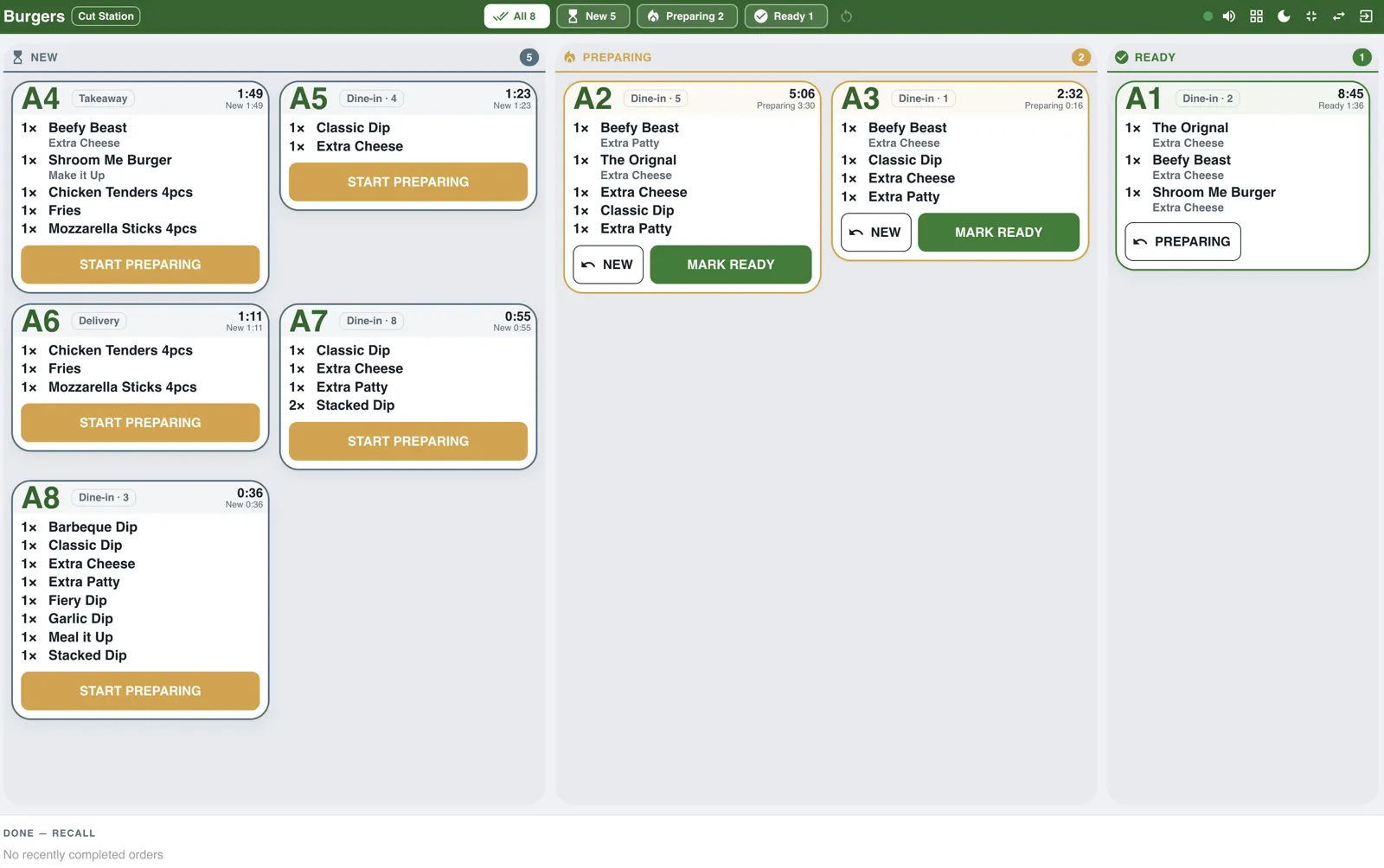
Granet Pro KDS burger station screen showing New, Preparing and Ready lanes
A live station screen: New, Preparing and Ready — one tap moves an order forward.

100+

orders a day through KDS in a live restaurant kitchen

0

paper tickets lost between counter and kitchen

Unlimited

stations — grill, drinks, bakery, salads, packing

Any

screen — tablet, TV box or the monitor you already own
From counter to pass

One order, five screens, zero shouting

Here is exactly what happens when a server confirms an order.

1

The order is taken at the POS

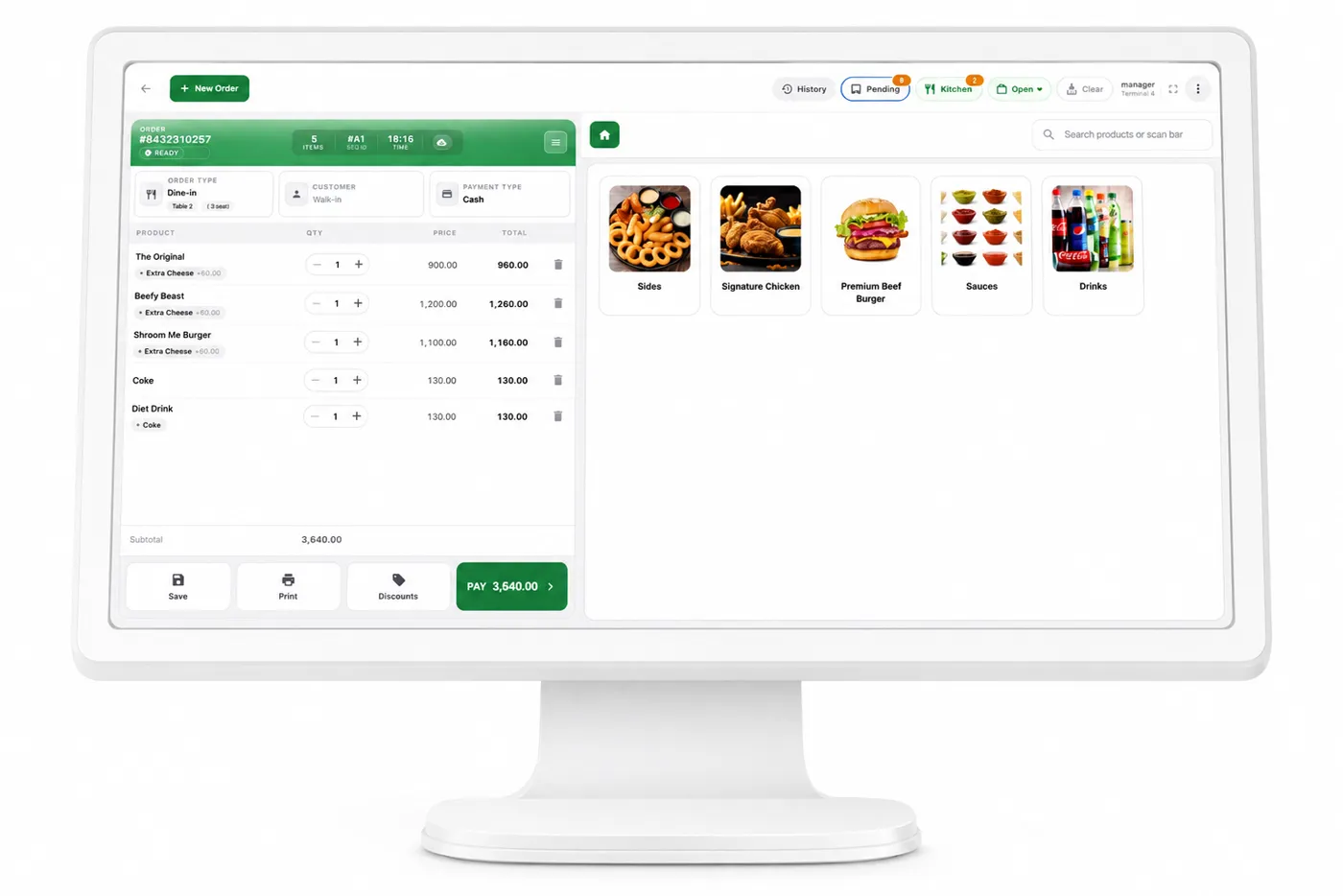
Items, modifiers, table number and order type — dine-in, takeaway or delivery. The moment it is confirmed, it is on the kitchen screens.

Granet Pro POS order screen with menu items and modifiers
Figure 1 — the POS order screen. Confirm once; every relevant station is notified.
2

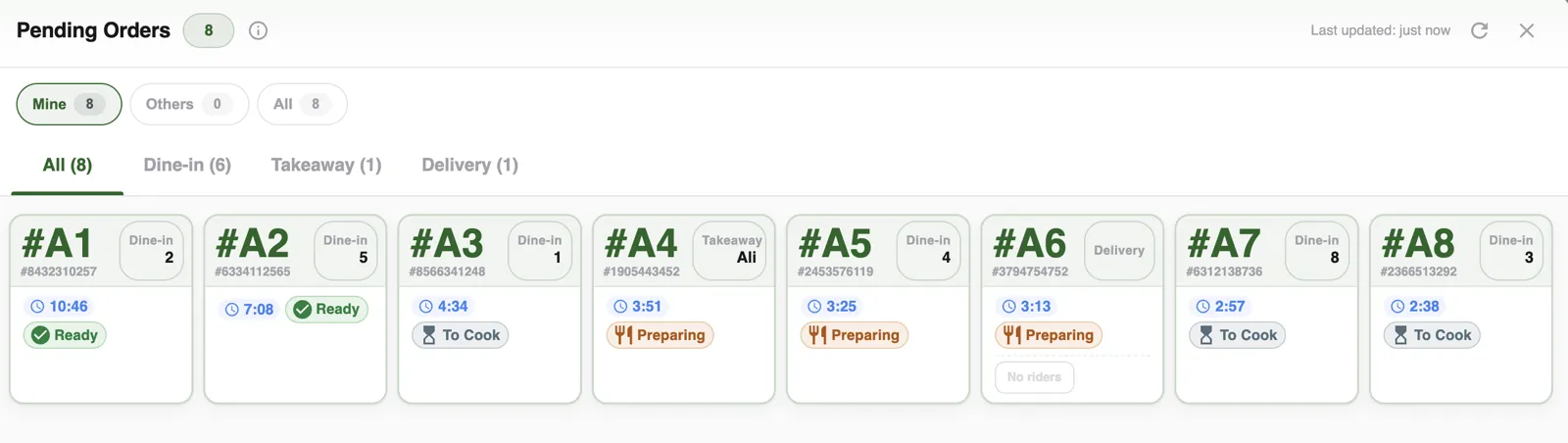
Every active order in one view

Status, table and elapsed time at a glance — so a manager can see the whole floor without walking it.

Granet Pro KDS pending orders dashboard with status and elapsed time
Figure 2 — the live order dashboard.
3

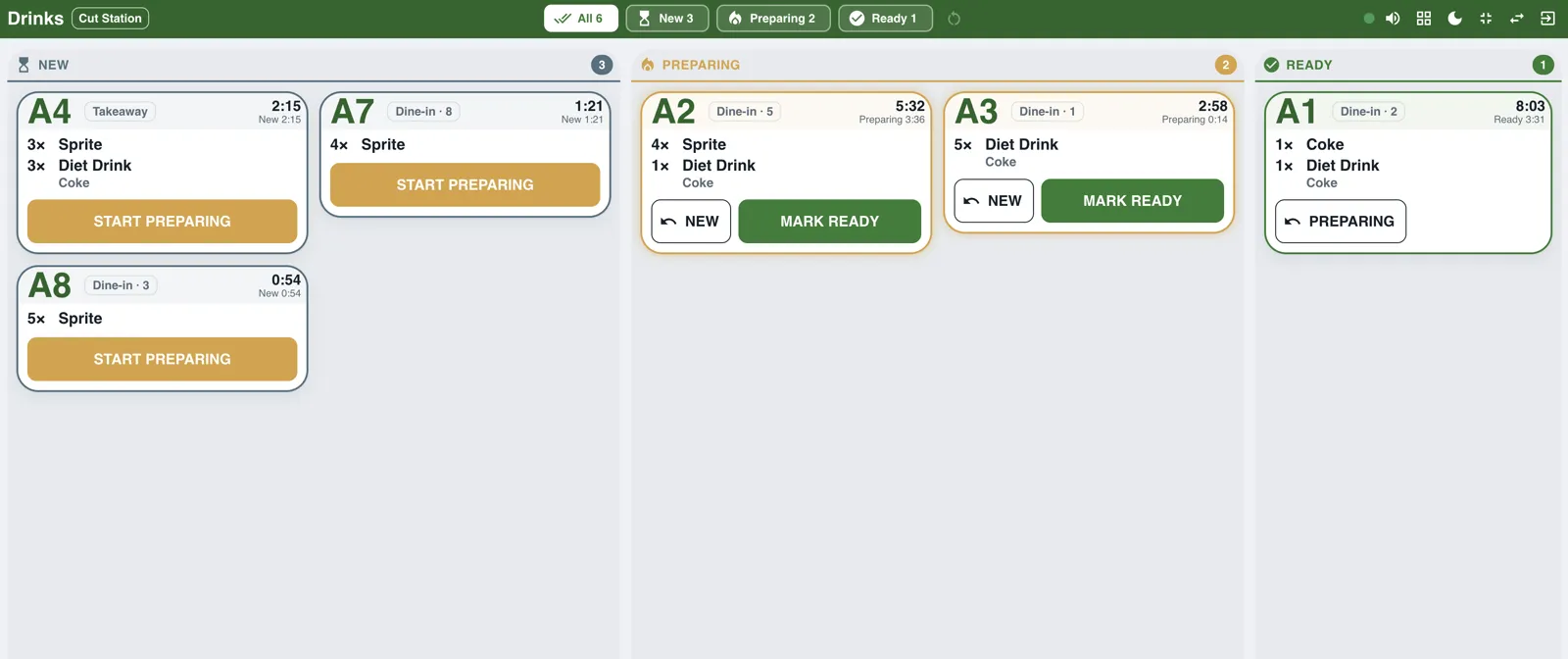
Each station sees only its own items

The grill screen shows burgers. The drinks screen shows drinks. Orders arrive with a sound alert and move through New → Preparing → Ready in one tap. Tapped something by mistake? The recall bar at the bottom brings it straight back.

Granet Pro KDS drinks station screen showing beverage items only
Figure 4 — the drinks station. Same workflow, zero interference from food items.
4

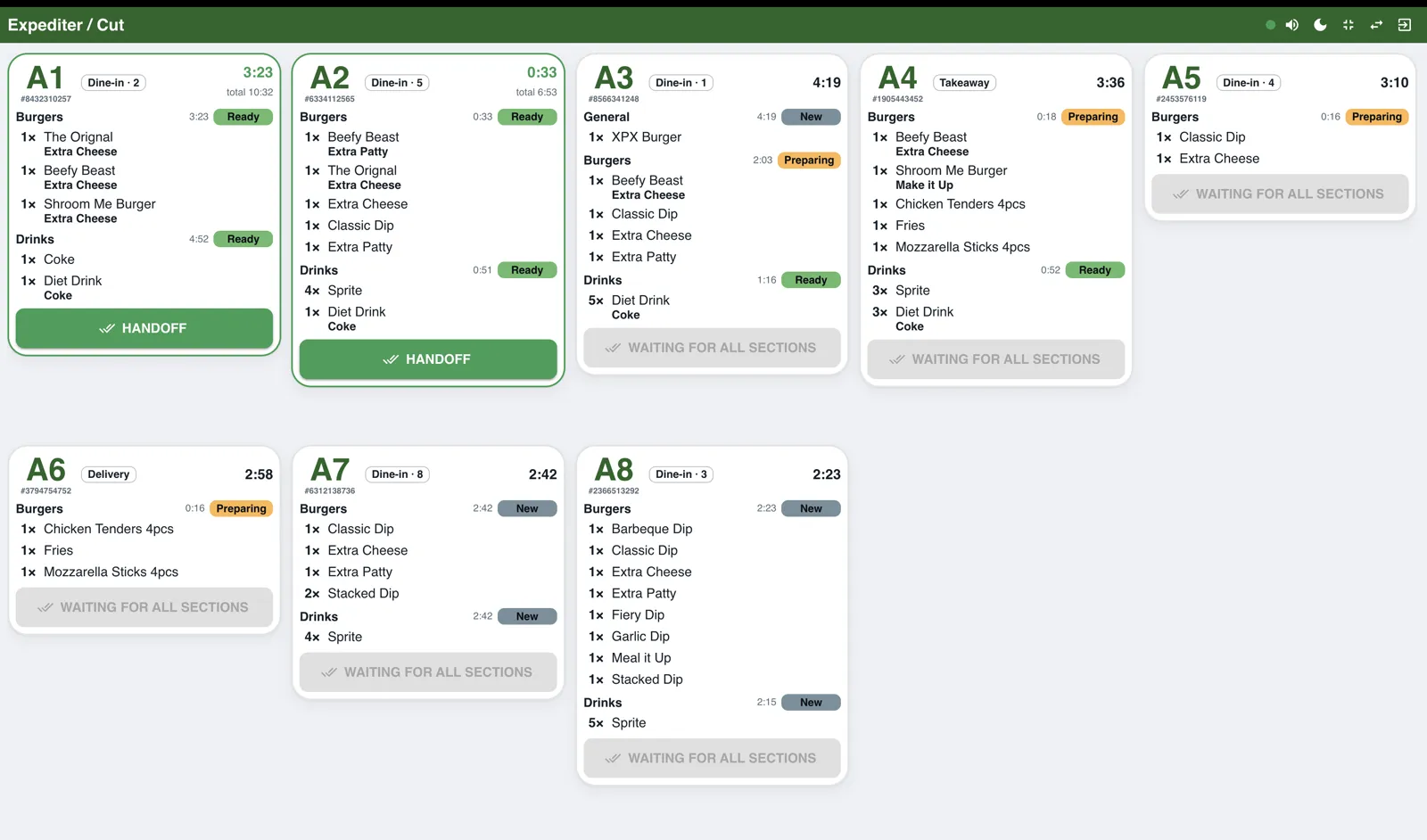
The expediter decides when it leaves the pass

One screen, every station's progress per order. When all sections are ready, the expediter triggers handoff — so the burger never goes out while the shake is still being made.

Granet Pro expediter and cut station screen aggregating all kitchen sections per order
Figure 5 — the expediter / cut station, aggregating every section per order.
5

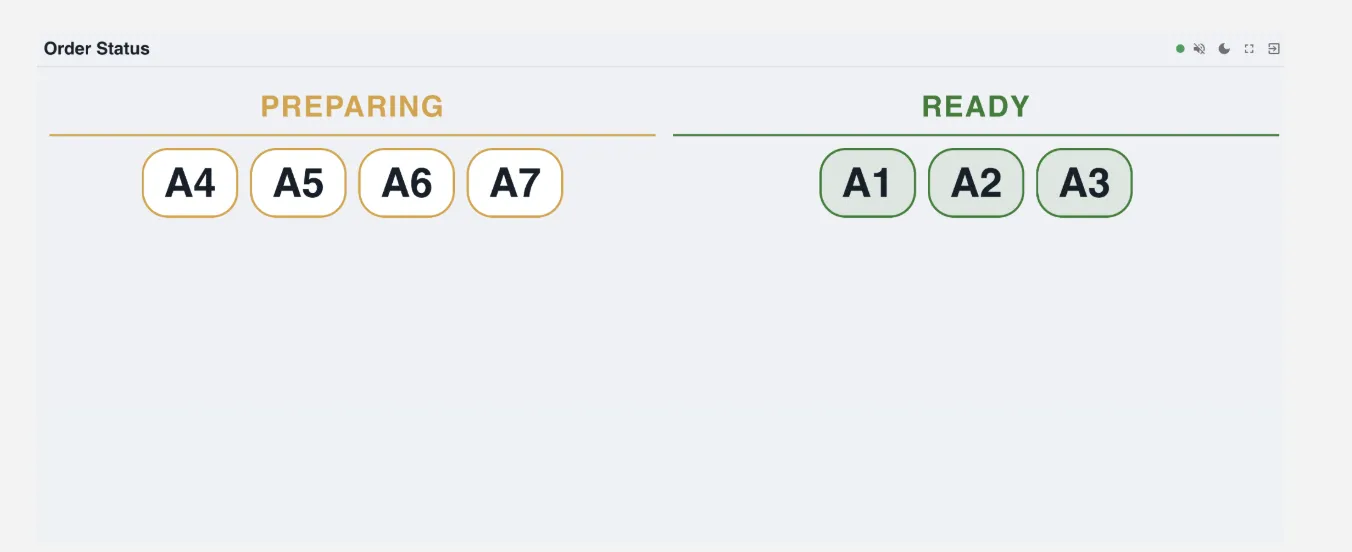
Guests check their own order

A screen in the dining area shows tokens under Preparing and Ready. Fewer interruptions at the counter, less crowding at the pass. It shows tokens and status only — never names, items or prices.

Granet Pro customer-facing order status display showing Preparing and Ready tokens
Figure 6 — the customer order status display.
6

Then you find out where the time actually went

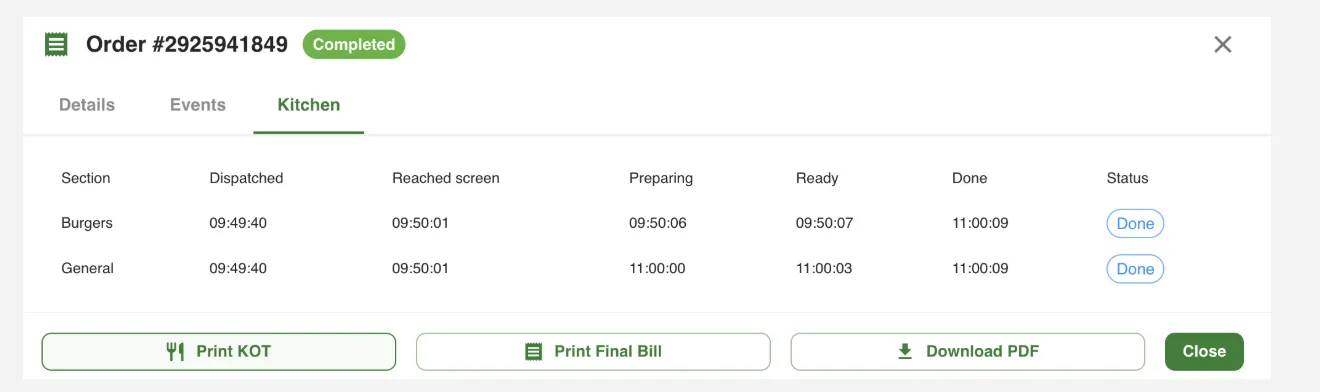
Every order keeps a section-by-section timeline from dispatch to done. That is how you stop guessing which station slows down at 9pm on a Saturday.

Granet Pro kitchen timeline report showing per-section timestamps from dispatch to done
Figure 7 — the per-order kitchen timeline.

Straight answer

Screens when you are online. Paper when you are not.

Kitchen screens need a live connection — that is true of every KDS. So we never took your printers away. Printed kitchen tickets keep running over your local network, and if the internet drops mid-service the kitchen carries on exactly as it always did while the screens reconnect and catch up on their own.

Billing at the counter never stops either, online or not. That is the whole point of an offline-first POS.

See how offline-first billing works →

What changes in service

Built for the speed your kitchen actually runs at

Nothing gets missed

No ticket falls behind a counter or gets stuck to a wet surface. Orders that sit too long turn amber, then red — so a forgotten order announces itself.

Fewer wrong plates

Each station only ever sees what it has to make, with modifiers spelled out under each item. Less reading, fewer misfires, less waste.

Edits reach the kitchen

If a server adds or removes an item, the station sees exactly what is new instead of re-reading the whole order — and already-cooked items are never remade.

Readable in a real kitchen

Big type, big tap targets, colour plus icon plus label — designed to be read from one to two metres away under bright light, with greasy hands.

Kitchen staff stay in the kitchen

A kitchen login opens the screens and nothing else. No access to billing, no access to reports, no accidental discounts.

Grows with the menu

Add a station when you add a counter. Any number of screens can serve the same station, and items that need no cooking never clutter a board.

FAQ

Kitchen display questions

What is a Kitchen Display System?

It replaces paper kitchen tickets with screens. When a server confirms an order, each station instantly sees only the items it is responsible for, and staff move each one through New, Preparing and Ready without leaving the station.

Does it work without internet?

The screens need a connection, which is exactly why we never removed printed KOTs. Printers run on your local network, so an internet outage means the kitchen falls back to paper and the screens catch up automatically afterwards. Counter billing keeps working offline regardless.

How many stations can I have?

As many as the kitchen needs. Each station is mapped to the menu sections it prepares, and several screens can show the same station if your line is long.

What is the expediter or cut station?

One screen showing whole orders with every station's progress together. When all sections are ready the expediter triggers handoff, so nothing leaves the pass half-finished.

Do I need special hardware?

No. The screens run in a normal browser, so an inexpensive Android tablet, a TV box or a spare monitor is enough.

Is KDS included in my plan?

KDS is available to Granet Pro restaurant customers — we switch it on for your branch and set up your stations with you. See plans → or ask us about your kitchen.

Put your kitchen on screens

Book a free demo and we will run your own menu through the stations — grill, drinks, expediter, customer display — so you can see exactly how service would look.

Related: Restaurant POS · Owner app · PRA integration